In most applications, the Hardware Manual Control Pendant (MCP) requires no programming and can manually operate and position the robot. For some applications, the Controller.ShowDialogMCP method provides a simple means for displaying a message on the MCP LCD display and reading a single numeric value and/or key press reply.
However, for sophisticated applications where more complicated MCP IO is required, a GPL program can directly write the contents of the MCP display and can read the key presses for most of the MCP keypad. For this mode of operation, a GPL program must execute StreamReader and StreamWriter Class methods to access the “/dev/mcp” device. When this device is opened for reading and writing, each time the program writes a string to this device, the MCP display is cleared and the new text is displayed. Each time selected keypad buttons are pressed or released, a key code is posted to an input byte FIFO that can be polled by the GPL program.
Keypad Input
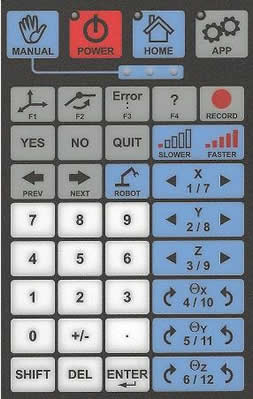
The MCP keypad looks as follows:
The top left three buttons (“Manual”, “Power”, and “Home”) and the manual robot positioning buttons with the blue background: always perform their standard functions; are not affected by connecting to /dev/mcp; and do not return key presses into the /dev/mcp input byte FIFO.
The “App” button is specifically for use with the ShowDialogMCP and the /dev/mcp functions and controls whether the LCD display and the remaining keys with gray and white backgrounds are utilized for the standard MCP functions or are redirected for use by ShowDialogMCP and /dev/mcp.
When the /dev/mcp is first opened, the LED on the App button is turned on and remains on continuously. In this mode, the LCD display and gray and white keys in the lower panel are dedicated to /dev/mcp. If the App button is pressed or certain system messages are displayed in the LCD, the App LED will slowly blink and control of the gray and white buttons reverts to the standard MCP functions. Pressing the App button again returns control to /dev/mcp.
When /dev/mcp is in control, each time a gray or white key is pressed, a key code is pushed into an input byte FIFO that can be accessed by the StreamReader methods. Each time a gray or white key is released, the same key code is OR’ed with &H80 is pushed into the input byte FIFO.
Each time that /dev/mcp gains control of the LCD display and the gray and white keys, the key code for the App key is pushed into the FIFO. Each time that /dev/mcp loses control, the key code for the App key OR’ed with &H80 is pushed into the FIFO.
The following table defines the key codes for each of the MCP keys that can be monitored by the /dev/mcp device.
| Keypad Key | Key Code (Decimal) | Notes |
|---|---|---|
|
SHIFT |
01 |
For all keys, &H80 is added to indicate when a key is released. |
|
PREV |
02 |
" |
|
NEXT |
03 |
" |
|
YES |
06 |
" |
|
DEL |
08 |
" |
|
ENTER |
13 |
" |
|
F1 - F4 |
14 - 17 |
" |
|
NO |
21 |
" |
|
QUIT |
24 |
" |
|
RECORD |
26 |
" |
|
+ / - |
45 |
" |
|
. |
46 |
" |
|
0 - 9 |
48 - 57 |
" |
|
APP |
63 |
Key press generated whenever /dev/mcp takes control of LCD display and keypad. Key release generated whenever /dev/mcp relinquishes control. |
LCD Display Output
When /dev/mcp is opened for writing and the App button LED is on, the MCP LCD display will show the contents of the last message written by the attached GPL program. Before each message is written, the display is cleared and the cursor is position at the first (top-left) character position.
If the App key is pressed or an event occurs such that control of the MCP temporarily reverts back to the standard system MCP functions, when the App key is pressed to regain control for /dev/mcp, the system automatically redisplays the last message written to /dev/mcp.
In addition to the standard ASCII characters that can be written to the LCD display, the following special character sequences are recognized.
| ASCII Sequence | Function |
|---|---|
|
LF |
(Decimal 10, GPL_LF) Move cursor to next line. |
|
CR |
(Decimal 13, GPL_CR) Move cursor to start of line. |
|
<ESC>L |
(Decimal 27, 76) Generate long Beep. |
|
<ESC>T |
(Decimal 27, 84) Generate short Beep. |
Sample Program
The following is a simple GPL program that gains control of /dev/mcp. Each time a keypad button is pressed or released, its key code value is displayed on the MCP’s LCD display and in the Console window.
    Public Sub MAIN
    Dim i As New StreamReader("/dev/mcp")
    Dim o As New StreamWriter("/dev/mcp")
    Dim ss As String
    Dim cc As Integer
        While True
            cc = i.Read()             ' Return -1 if no input
            If (cc > 0) Then
                ss = "Key action:  " & Chr(GPL_CR) & _
                        Chr(GPL_LF) & "     " & _
                        CStr(cc And 127) & "  " & _
                        CStr(cc And 128) & "  " & _
                        CStr(cc)
                o.Write(ss)           ' Display on MCP LCD
                Console.WriteLine(ss) ' also on Console
            End If
            Thread.Sleep(10)          ' Wait before testing again
        End While
    End Sub