2.1. Ethernet Network Topology and Switches Verses Hubs
Ethernet-based slave controllers are connected to the master controller via 100Mbit Ethernet. For proper operation, the controllers should be configured as described below.
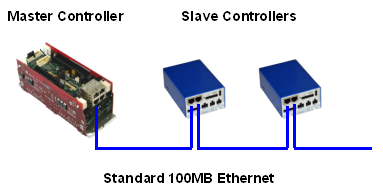
A simplified drawing illustrating the logical structure of the Servo Network is as follows:
To synchronize motion control operations across all of the controllers, the master simultaneously sends position or torque setpoint information to all slave controllers at a fixed rate via Ethernet. The master computes these setpoints based on the desired trajectory and the kinematic configuration of the mechanism being controlled.
All controllers must be connected by a full-duplex, 100Mbit Ethernet network using Ethernet switches. Switches, rather than hubs, must be used to avoid the lack of determinism caused by collisions on the network. The ideal network is in a star topology where all controllers are connected to a single switch as shown below:
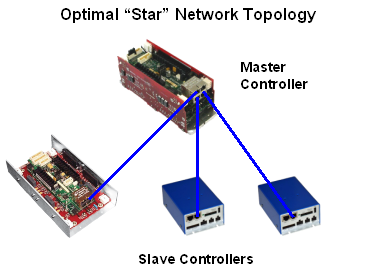
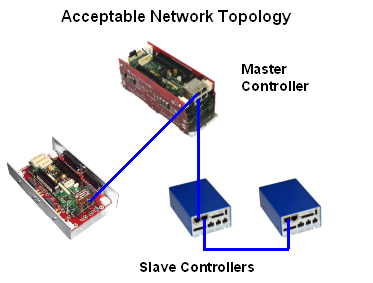
However, a small series of cascaded switches is also allowed. So, either topology or any combination is allowed so long as only Ethernet switches and no hubs are employed
All Guidance G3xxx and G2xxx controllers are equipped with either two or four Ethernet ports. If the top board has digital input and output connectors that accept IDC plugs, the controller has an embedded 100Mbit Ethernet switch connected to the Ethernet ports. If the board contains individual plugs for digital input and output signals, the controller is very old and does not have an Ethernet switch and should not be used in a Servo Network.
All Guidance G1xxx controllers are equipped with either a two or four port Ethernet switch and can be used in a Servo Network.
2.2. Hardware Master/Slave Configuration
Most Precise controller boards include a DIP switch or jumper that selects between master and slave operation. Consult the Hardware Reference section for your particular controller. The master controller must have the DIP switch or jumper set to the master location. By default all Precise controllers are configured as master controllers.
Each slave controller may have its DIP switch or jumper set to the slave position. Alternatively, DataID 134 may be used as described below. A node is considered a slave if either (or both) the hardware or software configuration specifies it as a slave.
2.3. Software Master/Slave Configuration
Precise controllers may be specified as a slave controller by setting the "Slave Mode" (DataID 134) database parameter to 1. Unlike most database parameters, this value is stored directly in the flash memory on the slave controller, not in .pac files. Alternatively, slave mode may be selected by using a DIP switch or jumper as described above. A node is considered a slave if either (or both) the hardware or software configuration specifies it as a slave.
Except for the master/slave designation, all slave software configuration is read from the *.pac files on the master controller.
2.4. Ethernet Controller Node Designations
As previously described, each controller or servo board in a Precise Servo Network must be assigned a node number. For Ethernet slaves, an element of the "Servo network node identifier" (DataID 151) parameter array must be set to the slave’s “Controller serial number”. This serial number may be found by using a browser to access the slave controller’s web interface login page.
The position of the controller serial number in the DataID 151 array determines the node number of the slave. This node number is used to reference the controller instead of Ethernet MAC IDs or IP addresses or controller serial numbers since node numbers are easier to remember and will not change if hardware is swapped out or reconfigured. For example, to specify a controller whose serial number is 0014FF-02300056 as node 2, set DataID 151 to:
DataID 151: "<master>", "0014FF-02300056", "", "", "", "", . . .
2.5. PreciseVision Considerations
Both PreciseVision and the Ethernet Servo Network can share the same physical network. If you are planning to use PreciseVision with an Ethernet camera and an Ethernet Servo Network system, you can connect the camera in several ways:
- You can connect the camera to a separate network interface card (NIC) on your PC.
- You can connect the camera to the end of a daisy-chained series of slave controllers.
- You can connect the camera to an external switch that is shared by the slave controllers. In this case, you must use a 100Mbit-only switch. If you connect both the Servo Network slaves and the camera to the same 1Gbit switch, the network will not operate. This restriction also applies to multi-speed 100Mbit/1Gbit switches.
2.6. Network Timing
The master controller sends setpoint data to all the motion control slaves at the regular interval specified by the parameter ”Trajectory Generator update period in sec" (DataID 600). All slave controllers send status information to the master with the same period.
In general, the trajectory update period should be set as long possible while still achieving acceptable motion performance. Typically this value is set to 4 milliseconds, but values from 1 to 4 milliseconds can be used. Networks with more nodes require a longer period to keep from overloading the network or the master controller.
The table below shows how many 4-axes slave nodes can be used for different trajectory periods.
| Number of 4-Axis Slave Nodes | Trajectory Period (msec) | ||
|---|---|---|---|
| 1 | 2 | 4* | |
|
1 to 3 |
Good |
Good |
Good |
|
4 to 5 * |
Maybe |
Good |
Good |
|
6 |
Bad |
Good |
Good |
|
7 to 8 * |
Bad |
Maybe |
Good |
|
9 * |
Bad |
Bad |
Good |
* Predicted results, not tested
A typical Precise slave controller has 4 servoed axes. A controller may be configured for fewer axes and some controllers have 6 axes. If you are using more or less than 4 axes per node, the network may support less or more nodes than the table indicates. The absolute maximum number of slave nodes is 15, regardless of the trajectory period.
In addition to the number of nodes, the Servo Network imposes an absolute maximum on the total number of axes. This maximum depends on whether or not External Trajectory mode is being used. See parameter "Ext trajectory enable" (DataID 440) for details on this mode. Most applications use standard trajectory mode. In no case can the total axes for all robots exceed these values.
| Controller Mode | Maximum Number of Axes |
|---|---|
|
Standard Trajectory Mode |
60 |
|
External Trajectory Mode |
36 |
2.7. Power On Timing
The logic power (24VDC) must be applied to the master controller and all the slave controllers at about the same time. After power-on and system loading, the master controller attempts to connect to the slave controllers for about 30 seconds. Any slave controller not responding within this time is assumed to be missing. Similarly, each slave controller waits for about 60 seconds for a connection request from the master controller. If none is received, the slave assumes that no master is present and enters an idle state where it accepts direct connections from the web interface.
2.8. Ethernet Servo Network Parameter Database Values
The following table summarizes the parameter database entries that may be accessed when configuring a Precise Servo Network system with Ethernet nodes.
| DataID | Parameter Name | Description |
|---|---|---|
|
110 |
Controller serial number |
Displays the controller serial number. This number cannot be changed and is set in the factory when the controller is manufactured. The value of this parameter on the slave should be copied to the proper entry in DataID 151 on the master. |
|
134 |
Slave mode |
Returns 1 if the local controller is in the Servo Network slave mode, either because the slave mode DIP switch is set or the NVRAM slave mode bit is set. When written, sets the NVRAM slave mode bit to the value written. If this value is changed, the controller must be rebooted. |
|
151 |
Servo network node identifier |
Must contain the serial number for each Ethernet slave controller. The first entry is automatically set to the serial number for the master controller. The order of the serial numbers in this array determines the “node number” of each slave controller. |
|
425 |
Servo network multicast IP address |
If only a single slave node exists, this parameter should be set to “0” to indicate that multicast should not be used. Otherwise this parameter should be set to “” to indicate the default multicast address should be used or it can be set to a specific multicast address if desired. |
|
600 |
Trajectory Generator update period in sec |
This defines how often the Trajectory Generator computes position set points for transmission to the servo subsystem. For most systems, Trajectory Generator update periods of either 2 msec or 4 msec works best. |
|
2010 |
Motor map nodes |
For each robot, this array must be filled in to indicate the network node that is responsible for controlling each axis. For example, “1,1,1,2,2” indicates that the first three motors of a robot are controlled by the master controller and the final two motors are controlled by the first slave. |