Feedforward Gains Tuning Procedure

The following is a general procedure for tuning the gains for the feedforward components.


Prior to modifying the turning, ensure that the robot has been properly mounted, all safety interlocks are functioning, and that the axis to be modified has already been tuned to the extent that it can moved safely under manual and program control.

  1. (Datalogging Preocedure)  In the following steps, when you are asked to collect a datalog, please collect a datalog with the standard “Tuning Default” values and set the datalogging "Log interval" to 0.004 seconds.  If you are using code older than GPL 4.0H8, in the steps below, you should examine the "Filtered feedforward torque" (12331) instead of the "Filtered ffwd plus gravity comp torque" (12340).  Additionally, if you are using an older GPL and your axis has gravity loading, in the datalog, you should replace the 12th collected value "Raw DC bus voltage" (12684) with "Gravity compensation torque" (12443) and you will need to add the values of 12331 and 12443 to get an equivalent value for 12340.

  2. (Setup) Zero the gains for all of the feedforward parameters (10336 “Acceleration feedforward gain”, 10337 “Velocity feedforward gain”, 10347 “Friction feedforward torque”, 10349 “Gravity compensation torque”) and 10351/10352 “Max positive/negative torque limits for PID feedback” to ensure they do no limit the performance of the axis.

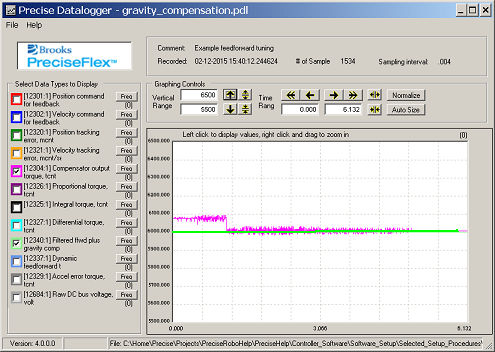
  3. (Gravity feedforward) If your axis has gravity loading, move the axis to one (or several) typical locations, and collect a datalog with motor power on and the axis stationary. Then, set 10349 “Gravity compensation torque” approximately equal to the axis’ typical value of 12304 “Compensator output torque”. Collect another datalog and confirm that 12340 "Filtered ffwd plus gravity comp torque" is approximately equal to 12304.


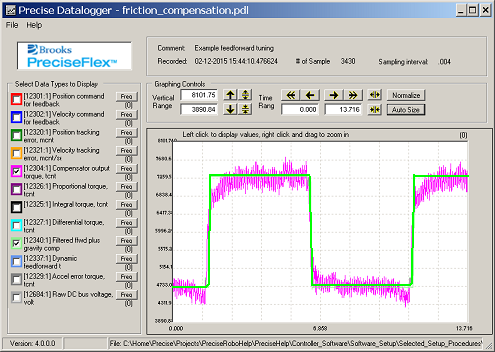
  4. (Friction feedforward) Execute a program that very slowly moves the axis back and forth and collect a datalog. Set 10347 “Friction feedforward torque” approximately equal to the positive magnitude of the step in the 12304 “Compensator output torque” when the axis is moving. Collect another datalog to verify that 12340 and 12304 are similar.


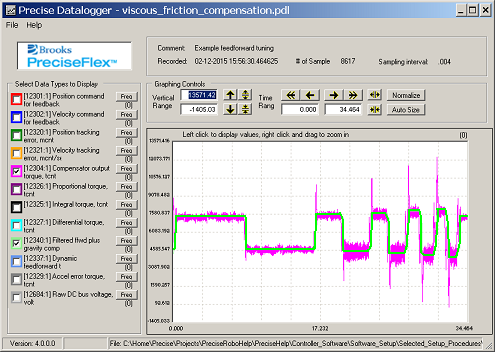
  5. (Velocity feedforward) Execute a program that moves the axis back and forth at several moderate and high constant speeds and collect datalogs of each constant speed section. Iteratively increment the value of 10337 “Velocity feedforward gain” until 12340 is approximately equal to 12304 during the constant speed sections of the motion. For this tuning, ignore the acceleration and deceleration sections of the motion.


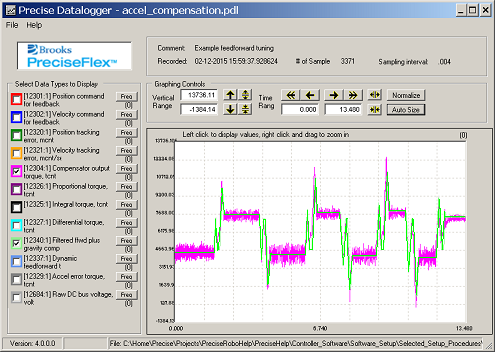
  6. (Acceleration feedforward) Execute a program that moves the axis back and forth at various accelerations/decelerations. Iteratively increment the value of 10336 “Acceleration feedforward gain” until 12340 is approximately equal to 12304 during the acceleration/deceleration sections of the motion.


  7. (Refinement) You typically need to tweak the values for the Acceleration, Velocity, and Friction gains to get a set of parameter settings that produces the best match between 12340 "Filtered ffwd plus gravity comp torque" and 12304 “Compensator output torque”. However, it is not necessary that these torques perfectly match. Even a rough match between these curves typically yields significant improvement in motion tracking. In fact, a perfect match is not possible due to non-ideal mechanical components.

  8. (Filtering) If the feedforward is too abrupt and generates noise or excites a resonance in the axis, the feedforward can be softened by adjusting 10328 “Feedforward SPR filter pole” and 10348 “Feedforward torque rate limit”.

  9. (PID) After the feedforward gains are set, you may wish to modestly adjust the PID gains, but this is not absolutely necessary.  In some cases, it may be possible to increase some the PID gains to further improve the performance of the axis.

End of procedure