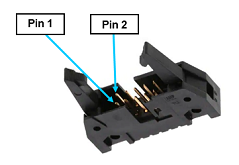
The HVCPU provides eight general-purpose digital output signals that are accessed in a single IDC connector. This type of connector permits these signals to be easily interfaced to other devices.
Each output can be individually configured as either "sinking" or "sourcing."
If an output signal is "sinking," the external equipment must provide a 5VDC to 24VDC pull-up voltage on the output pin and the controller pulls this pin to ground when the signal is asserted as true. This configuration is compatible with "sourcing" (PNP) devices.
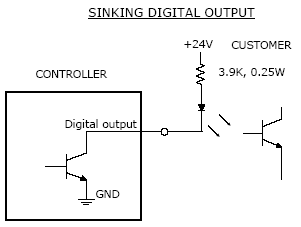
Figure 17-33: DIO Sinking Output
If an output signal is "sourcing," the external equipment must pull-down the output pin to ground and the controller pulls this pin to 24VDC when the signal is asserted as true. This configuration is compatible with "sinking" (NPN) devices.
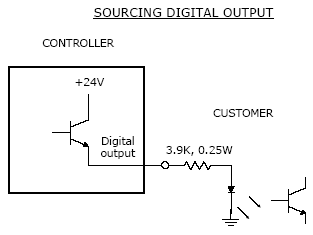
Figure 17-34: DIO Sourcing Output
In place of the hardware jumpers that were employed in earlier Guidance controllers to configure the sinking / sourcing mode of operation, in the G6000 controllers, these settings are changed via software parameters. This method is more convenient especially if the controller is embedded in a robot. Table 17-14 lists the parameters that control the digital outputs modes of operation.
| Parameter Database ID | Parameter Name | Default Value | Description |
|---|---|---|---|
|
530 |
DOUT sink mode 1, 2, 3, 4, 5, 6, 7, 8 |
1 (Sinking) |
For newer controllers that support software DIO configuration, this parameter sets and displays whether local digital output signals operate in sinking or sourcing mode. Each output signal's mode can be individually set. The output is sinking if its corresponding element is 1, otherwise a value of 0 indicates sourcing. By default, all local outputs (GPL signals 13-20) are set to sinking. |
To modify the sinking/sourcing mode of operation for one or more digital outputs, use a browser to open the controller's web interface and access the following page: Setup®Parameter Database®Controller®System DIO. To save modifications, click Set new values followed by Save All to Flash.
NOTE: Whenever saving to flash, to turn off the controller, wait 10 seconds after the "Flash Busy" indicator disappears to ensure the flash disk is not corrupted.
The pin out for the Digital Output Connector and the corresponding GPL signal numbers are described in Table 17-15.
| Pin | GPL Signal Number | Description |
|---|---|---|
|
1 |
13 |
Digital Output 1 |
|
2 |
14 |
Digital Output 2 |
|
3 |
15 |
Digital Output 3 |
|
4 |
16 |
Digital Output 4 |
|
5 |
|
24VDC |
|
6 |
|
GND |
|
7 |
17 |
Digital Output 5 |
|
8 |
18 |
Digital Output 6 |
|
9 |
19 |
Digital Output 7 - If it is desired to use this output separately from the other DOUT, as a wiring convenience, this signal is also available on the Output Signal 7 Connector. |
|
10 |
20 |
Digital Output 8 - This digital output is often configured to track the controller's Status LED so that an external light can be driven to convey the same information. As a wiring convenience, this output signal is also available on the Status Output Signal Connector. |
|
User Plug Part No |
|
AMP 746285-1 or Molex 22-55-2101 or 90142-0010. For the Molex plug, use Molex pins 16-02-0103 and Molex crimp tool 63811-1000. |